Swift Concurrency (Part 2): from ideas to real-world cases
Author : ChungHA
Swift Concurrency (Part 2): from the ideas to the real-world cases built on top of them.
Before writing this article I read through all of Swift-Evolution to understand what the ideas are, read every kind of document explaining why Apple wrote things the way they did and what direction Apple wants to go next. And if you’re an Android Dev, you can read the article on how suspend functions work before reading this one of mine.
- Link : https://www.swift.org/swift-evolution/
- Link : https://speakerdeck.com/inamiy/iosdc-japan-2021?slide=124 , a talk from 2021 but incredibly valuable
Knowing the syntax is not the same as understanding how the system works. Why won’t the compiler let you pass this class between tasks? Why does an actor — whose whole job is to protect its state — let that state change right in the middle of its own method? Why can one harmless little semaphore hang the entire app? As long as you have to memorize the answer case by case, Swift Concurrency will keep looking like a messy pile of tangled rules. Beginners are going to cry.
The thesis of this article is: Swift Concurrency stands on exactly a small set of ideas, and once you see them, the “confusing” things stop being confusing — they turn into consequences you can derive yourself. Everything works the way it does for a reason, and the reason is understandable.
There are 4 main ideas I found most rewarding when I read up on this:
- How a function actually runs without waiting.
- What isolation really is and what an actor actually protects.
- What
Sendableproves, and why you need to implement it. - Why tasks can come in two flavors: structured and unstructured.
Each idea ends with a series of consequences, and each consequence is a real situation from real code. The whole article has 20 consequences, numbered continuously throughout.
Let’s start with the first idea, because everything else is built on it.
Idea : There’s no such thing as “waiting”. There’s only a function cut into pieces.
Forget the word “await” for a moment. Nothing in Swift Concurrency actually “waits”. To see what really happens, we need two pieces of background: what a thread is, and where a function’s data lives.
What a thread is. A thread is a “worker” provided by the operating system. It executes instructions one at a time, in order, and can do exactly one thing at any given moment. A CPU core is the real hardware that runs a thread: a 6-core chip can run 6 threads at the same time. The OS can create more threads than there are cores, called OS Threads, but then it has to rotate threads on and off the cores, and each thread is expensive: it needs its own memory region, and the OS spends extra effort managing it too.
–> It’s costly, expensive –> so people had to figure out how to make it cheaper…
–> Those of you who code Android, I’ve probably said this to you many times already, including in my teaching sessions and Concurrency talks.
A quick refresher: where a function’s data lives: stack and heap.
A program has two kinds of memory.
- Stack belongs to a thread: each thread has exactly one. When a thread runs a function, the function’s local variables are placed on that thread’s stack, and they are wiped clean the moment the function returns. Fast, but with two hard constraints: the data dies with the function, and it can only be reached from that one thread.
- Heap is the opposite: a shared region that belongs to no thread. Data there lives as long as someone holds a reference to it, and any thread can reach it. This is where instances of a class live — that’s why an object can be passed around everywhere and outlive the function that created it.
There’s one case that combines both, worth spelling out because we’ll use it shortly: a local variable of a class type.
Write let session = NetworkSession() inside a function, and the data splits in two.
The object itself, with all of its properties, is created on the heap. The local variable session is just a reference to it: a small value (essentially the address of the object in memory) sitting on the thread’s stack like any other local variable. When the function returns, the reference on the stack is erased, but the object on the heap keeps living as long as someone else holds a reference.
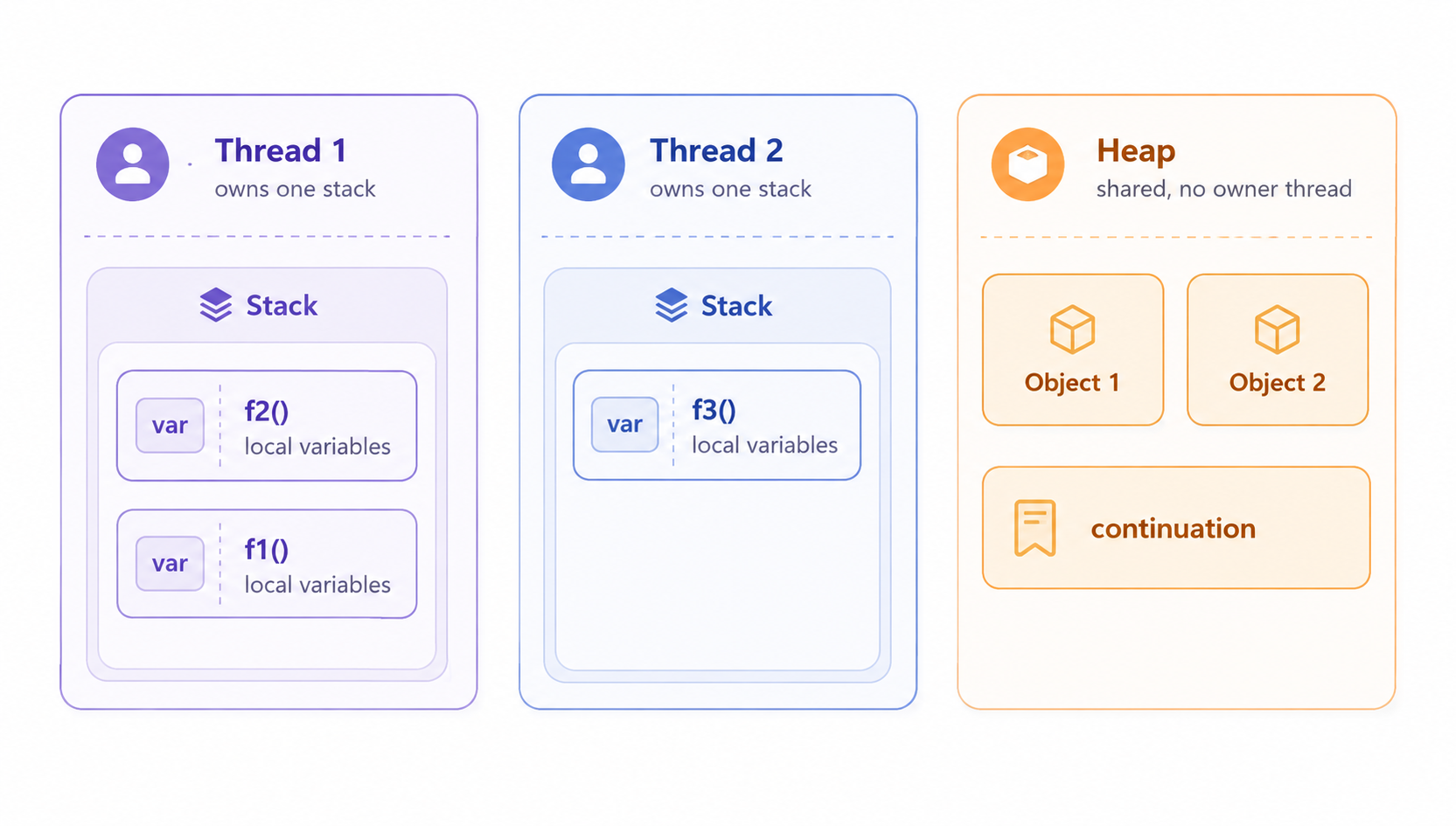
Remember the key difference: the stack is tied to a thread and a running function, while the heap is tied to neither.
What the compiler does with an async function. When you write an async function, the compiler cuts it into small pieces. Let’s name each piece so we can use it throughout the article: a chunk is one continuous block of synchronous code lying between two cuts. A cut only happens at await, not on every line:
func loadAvatar() async throws -> UIImage {
    let cacheKey = "avatar-key"                  // chunk 1
    let url = try await fetchProfileURL()        // ← cut: chunk 1 ends by starting the call,
                                                 //        chunk 2 begins by receiving the url
    logger.log("got \(url)")                     // chunk 2
    let data = try await download(url)           // ← second cut
    let image = decode(data)                     //
    cache.store(image, for: cacheKey)            // ] chunk 3
    return image                                 //
}
One detail to avoid confusion about where the cut happens: the line with await is shared between two chunks. The last action of chunk 1 is to start the fetchProfileURL() call. If the result isn’t ready immediately, the cut happens at exactly that moment. The first action of chunk 2 is to receive the result and put it into url. So the await line isn’t “outside” the chunks — it’s the boundary between them.
Now the problem. url is created in chunk 1 but used in chunk 2. cacheKey is created in chunk 1 but used even later, all the way in chunk 3. Between those chunks the function is not running at all, and the thread that ran chunk 1 doesn’t sit there waiting: it goes off to run other code. That other code needs space on the stack, and it takes the very space chunk 1 was using, overwriting it. So the stack can’t carry anything across that gap, for the same reason it can’t carry the local variables of a function that has already returned: the stack belongs to whatever is running right now. (There’s a second reason too, which the next pages will make clear: the chunk after the gap might not even run on the same thread, and one thread can’t reach another thread’s stack.) So the compiler saves the still-live variables into a special object, and puts that object on the heap — the only region that survives everything and belongs to no thread.
That object is the continuation. To be precise about who lives where: the variables (url, cacheKey) are stored inside the continuation, while the continuation itself is an object on the heap. The name comes from computer science and means it literally: a continuation is “everything that still has to be done from this point on”. Physically it’s very much like a closure: a place in memory holding (a) the saved local variables and (b) the address of the code to run next, i.e. the next chunk. When the await result arrives, the runtime takes this object, hands it to a thread, and the thread jumps to the saved address with the saved variables. That action is called resuming the continuation. There’s nothing magical about it: saved state plus a “bookmark” saying “continue from here”.
–> You Coroutine coders find this easy, right? If you know Android, learning Swift is a piece of cake.
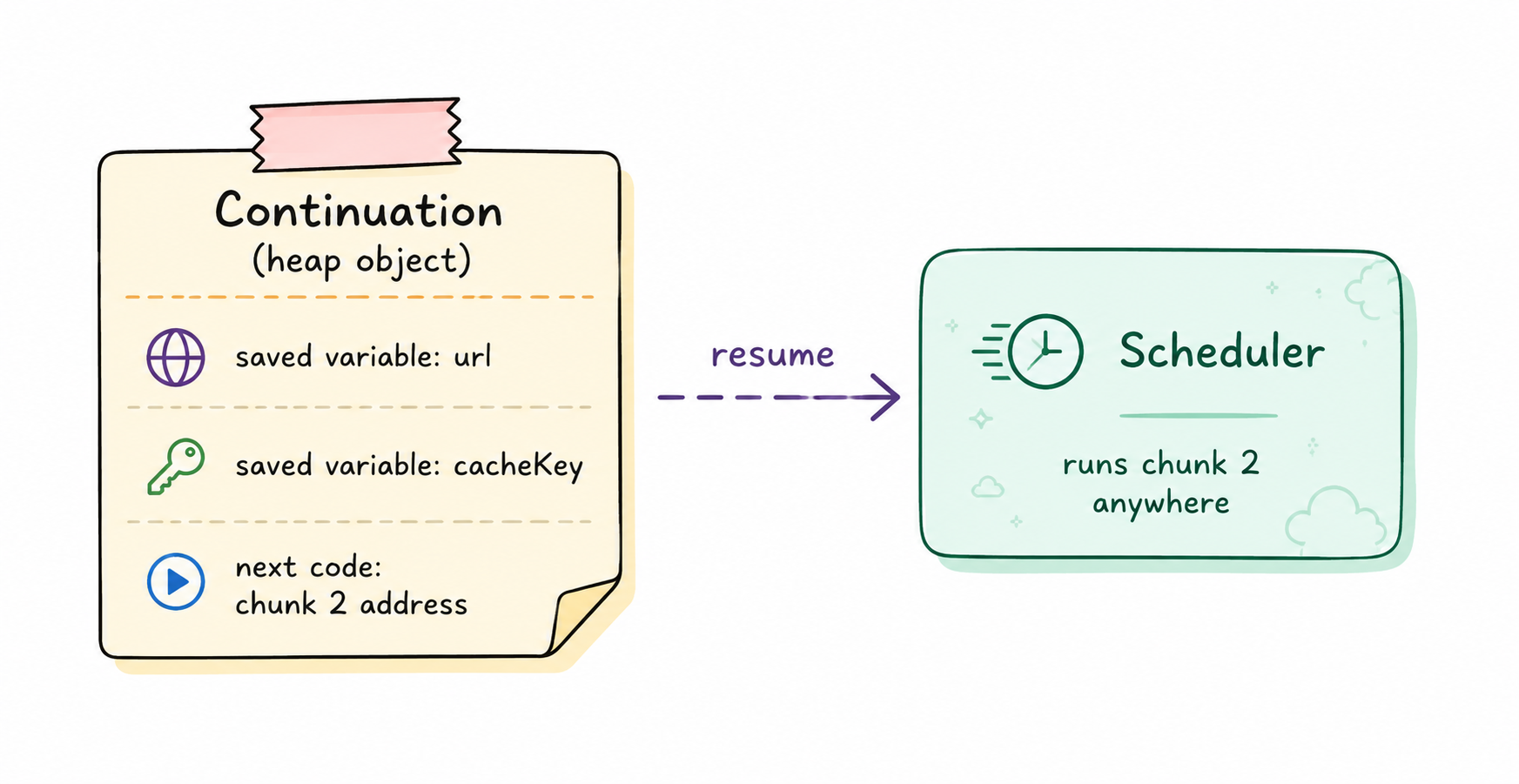
So why call it “await” if nothing waits? Because there is something that waits: the logical timeline of your function itself. From the point of view of the code you wrote, the next line really doesn’t run until the result is there. The function’s logical timeline pauses right there. The thing that doesn’t wait is the thread. The name describes the view from inside the function, not the machinery underneath, and Swift inherits it from C# and JavaScript — you can learn it from Kotlin Coroutines too. “suspension point” — and that’s exactly the term Swift’s official documentation uses: await marks a real suspension point. Real, because if the result happens to be ready immediately, there’s no need to cut anything and the function just keeps running.
Who runs the chunks. Swift Concurrency runs them on a cooperative thread pool: a group of threads the system creates specifically to run chunks, roughly one thread per CPU core, and that number never grows. A modern iPhone has 6 cores (the A19 Pro in the iPhone 17 Pro: 2 performance + 4 efficiency), so the pool is about 6 threads. This contrasts with the old GCD model, where one blocked thread made the system spin up another, then another, up to 64 threads — the so-called thread explosion, each thread eating memory and OS scheduler cost. The cooperative pool takes the opposite deal: the number of threads is small and fixed, in exchange for your code absolutely never blocking a thread in the pool. Nothing enforces this: the compiler still lets you do it, and the runtime doesn’t intervene either. Keeping that promise is your job, and the cases below are the consequences if you don’t follow the rule.
How the pool relates to all the other threads. Threads in the pool aren’t special hardware, nor a separate kind of thread. An app has many threads: the main thread, ~6 threads of the cooperative pool, plus threads created by GCD, by the networking machinery, by third-party libraries. They’re all ordinary OS threads, and the OS scheduler spreads them all across the same 6 physical cores. So the thread pool does not own cores. What makes them a “pool” is only their work and their rules: they’re the threads Swift Concurrency uses to run chunks, and they honor the “never block” contract. The main thread is not part of this group: it exists separately, runs the UI, and Swift Concurrency treats it as a distinct executor (this matters in a later section, when @MainActor shows up).
Note what the pool model is getting at: a suspended function has no “thread that’s running it, no thread that ran those suspended pieces”. It’s not “paused on thread 4, planning to come back to that exact one”. When suspended, it’s an object on the heap, and the question “which thread does it belong to” has no answer, just like for any other object on the heap. There’s no thread affinity — by design. (The main thread and @MainActor are a special exception with their own rules, covered in detail in a later section.)
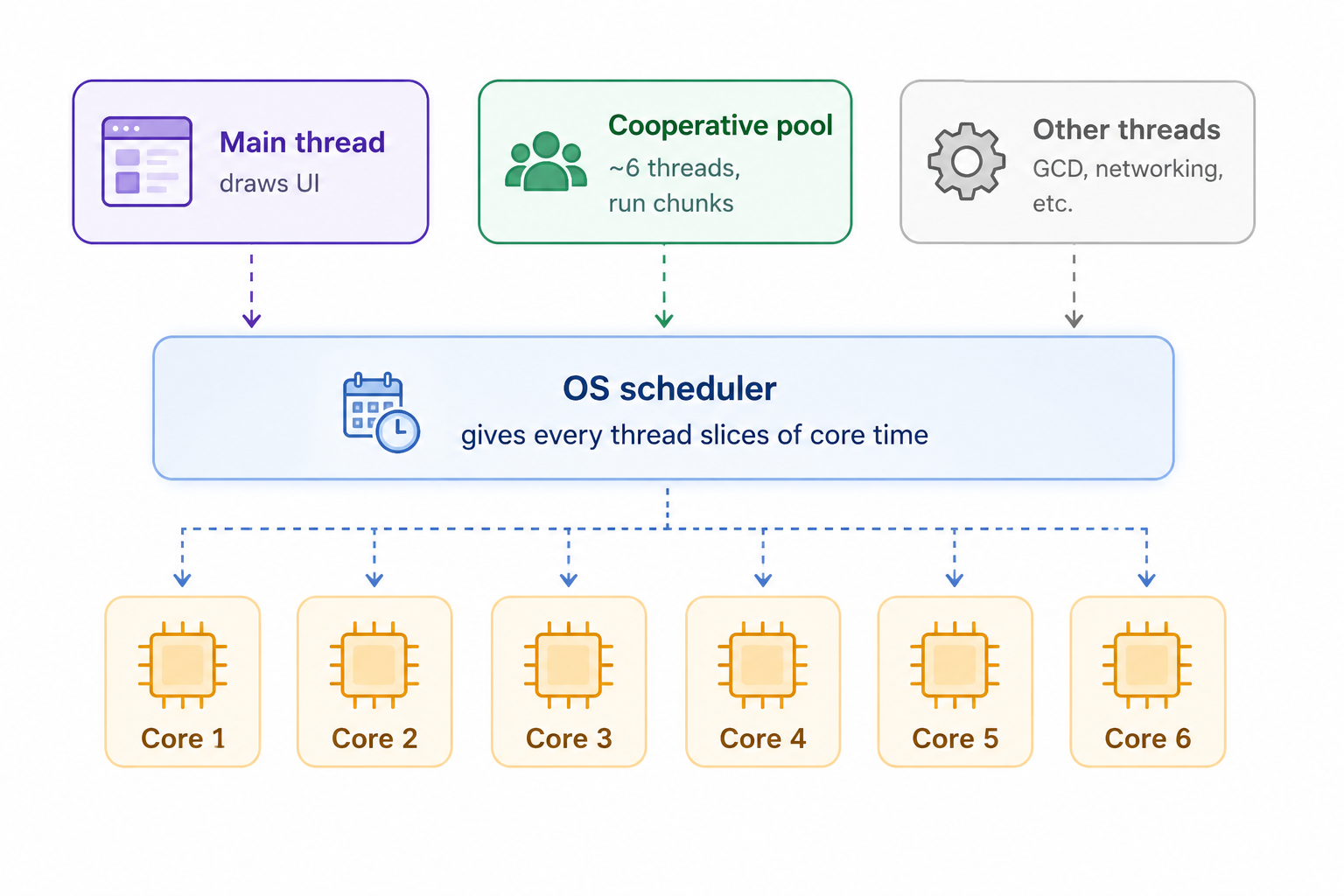
Questions to move on to the next part: hugely valuable if you’ve understood what I said above.
What if there are more tasks than threads? That’s the normal state, not a problem at all. A suspended task is a heap object of a few hundred bytes, and it occupies no thread at all. Ten thousand tasks on six threads is routine: the ready chunks sit in the scheduler’s queue, and threads pick them up one by one, highest priority first. For comparison, a thread needs about half a megabyte of stack plus a trip into the kernel every time it’s switched.
This very asymmetry is the entire reason the model exists: many suspended tasks are cheap, mapped onto a few expensive threads.
Does 6 threads mean you can only load 6 images at a time? No, and the reason clarifies what threads are actually for. A thread is needed for exactly one thing: executing code, i.e. running CPU instructions. Chunks of an async function run on the thread pool, but “running code needs a thread” holds for all code in the system. Here’s a loadImage function:
func loadImageFromUrl(_ url: URL) async throws -> Image {
    let request = makeRequest(url)        // thread pool, just a fraction of a millisecond

    let (data, _) = try await URLSession.shared.data(for: request)
    // ← the function suspends here.
    //   While the data is transferring (99% of the time) NO code runs for this download,
    //   on any thread. The bytes are moved by the network chip and the OS.
    //   When the response is ready, system code runs briefly on one of the
    //   "other threads" in the diagram above and resumes the continuation.

    return decode(data)                   // back on the thread pool: real CPU work
}
The part that sounds strange is “no code runs”. So who is waiting for the data? Nobody, literally. Modern systems don’t implement “waiting” by having a thread stand in a loop asking “done yet?”. They implement it as a doorbell. The request is handed down to the OS and then to the network chip — a separate physical device that moves the bytes itself, without the CPU executing anything. The OS notes “when this request’s data comes back, notify the app”, and until the bell rings (a hardware signal called an interrupt), not a single instruction is spent on this download.
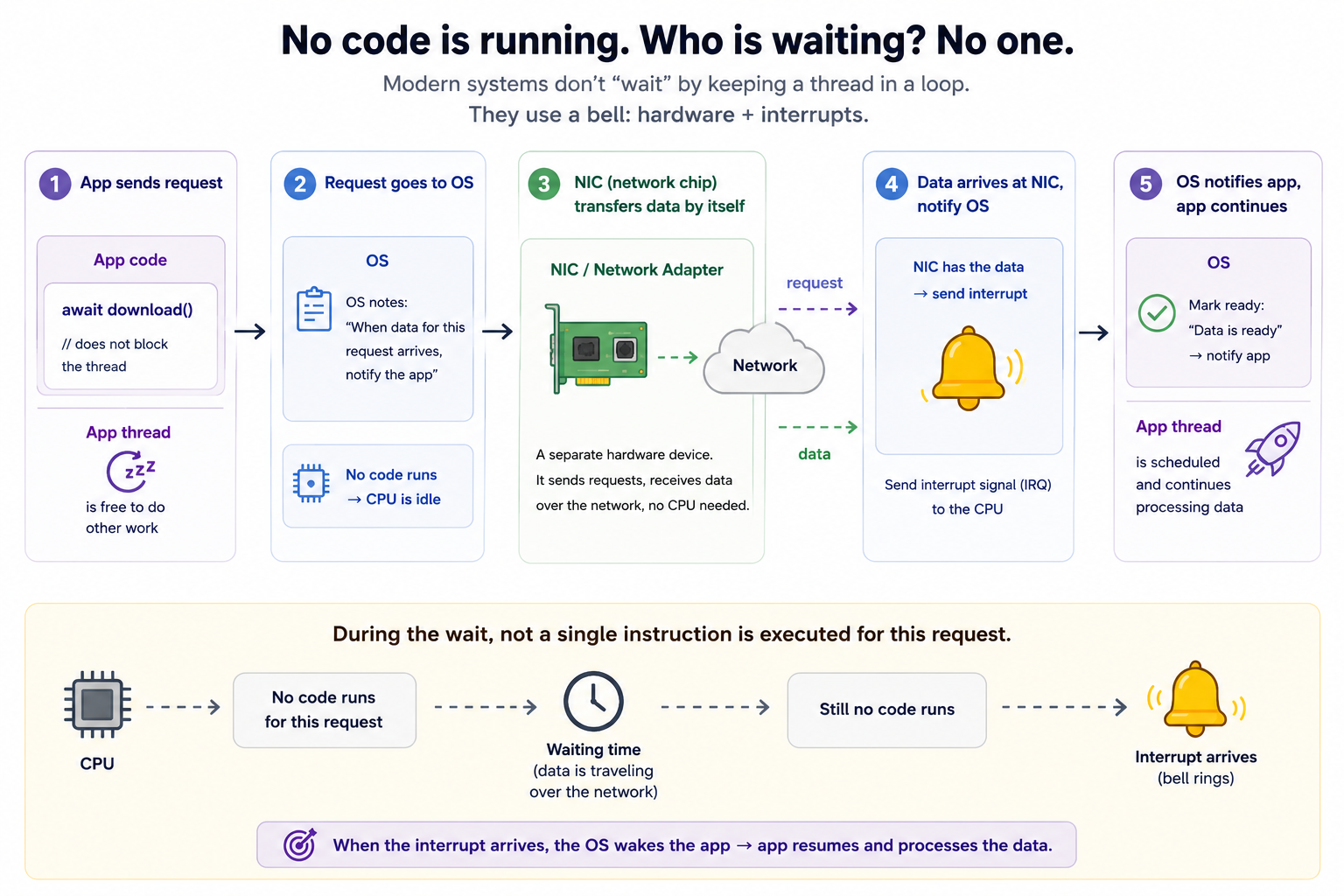
So let’s do the accounting for 100 concurrent downloads: the first and last lines of loadImage are brief moments of running code, while the data transfer — which takes up almost all of the time — costs 0 threads and 0 CPU. That’s why all 100 transfers really do happen concurrently. The only thing capped around 6 is concurrent code execution: when all 100 images come back and need decoding, the decode(data) chunks will run roughly 6 at a time. And that’s not a weakness of Concurrency, it’s the hardware: the chip has 6 cores, so more than 6 computations simply never run at the same instant. Adding threads doesn’t make it compute faster either, it just makes them take turns on the same 6 cores while still paying the switch cost.
What about a function that does both kinds of work?
func loadAndDecode() async throws -> PreparedData {
    let raw = try await network.get()   // its own `cut` here
    return heavyDecode(raw)               // its own chunk: pure CPU work
}

// The caller only sees one await:
let data = try await loadAndDecode()
From the caller’s side there’s just one await, and the caller is suspended for the entire duration. But that one await says nothing about what happens inside. Inside loadAndDecode, the same Concurrency repeats recursively: it has its own cut at network.get() and its own chunks. The chunk that kicks off the request runs on the thread pool, then it suspends for the data transfer (no thread, as we just saw), then the heavyDecode chunk really does occupy a thread pool thread, because decoding is pure CPU work. So exactly as you’d guess: part of this function’s lifetime uses the thread pool, part uses nothing, even though the caller sees only one seamless await. Awaiting a function only means “my timeline pauses until it returns”. How many threads it uses inside, and when, is decided by its own cuts.
So when do things blow up? Only when a chunk that’s currently on a thread refuses to release it: blocks it, or blocks it for too long. That breaks how the pool is supposed to work, and the consequences below are all variations of exactly this one violation, plus a few direct consequences of the fact that “no thread runs a single func forever”.
Consequence 1. After an await, you can wake up on a different thread.
func report() async {
    printCurrentThread()   // <NSThread: 0x...>{number = 4, ...}
    try? await Task.sleep(for: .seconds(1))
    printCurrentThread()   // <NSThread: 0x...>{number = 7, ...}
}

// A synchronous helper, see the note below.
func printCurrentThread() {
    print(Thread.current)
}
Same function, different thread, and this is the correct behavior: after the cut, the next chunk went to whichever pool thread was free first. About that helper — it proves this section’s point even better than the example: in Swift 6 language mode, calling Thread.current directly in async code won’t compile.
Foundation marks it as unavailable from an async context, precisely because the answer can change at every await and the language refuses to let you depend on it. Asking through a synchronous function is just a workaround for the demo.
The numbers like number = 7 do not mean there are at least 7 threads in the pool.
The number is just an identifier among all the threads of the process, and as we’ve seen, a running app has plenty of threads outside the pool. The ~6 pool threads carry whatever numbers they happen to get.
Also, waking back up on the same thread as before is possible, but that’s a coincidence, never a guarantee.
This is why thread-local storage and anything indexed by “the current thread” can change across an await.
(One exception: code isolated to @MainActor always resumes on the main thread. That’s not thread affinity coming back, it’s isolation — the topic of a later section, maybe part 3.)
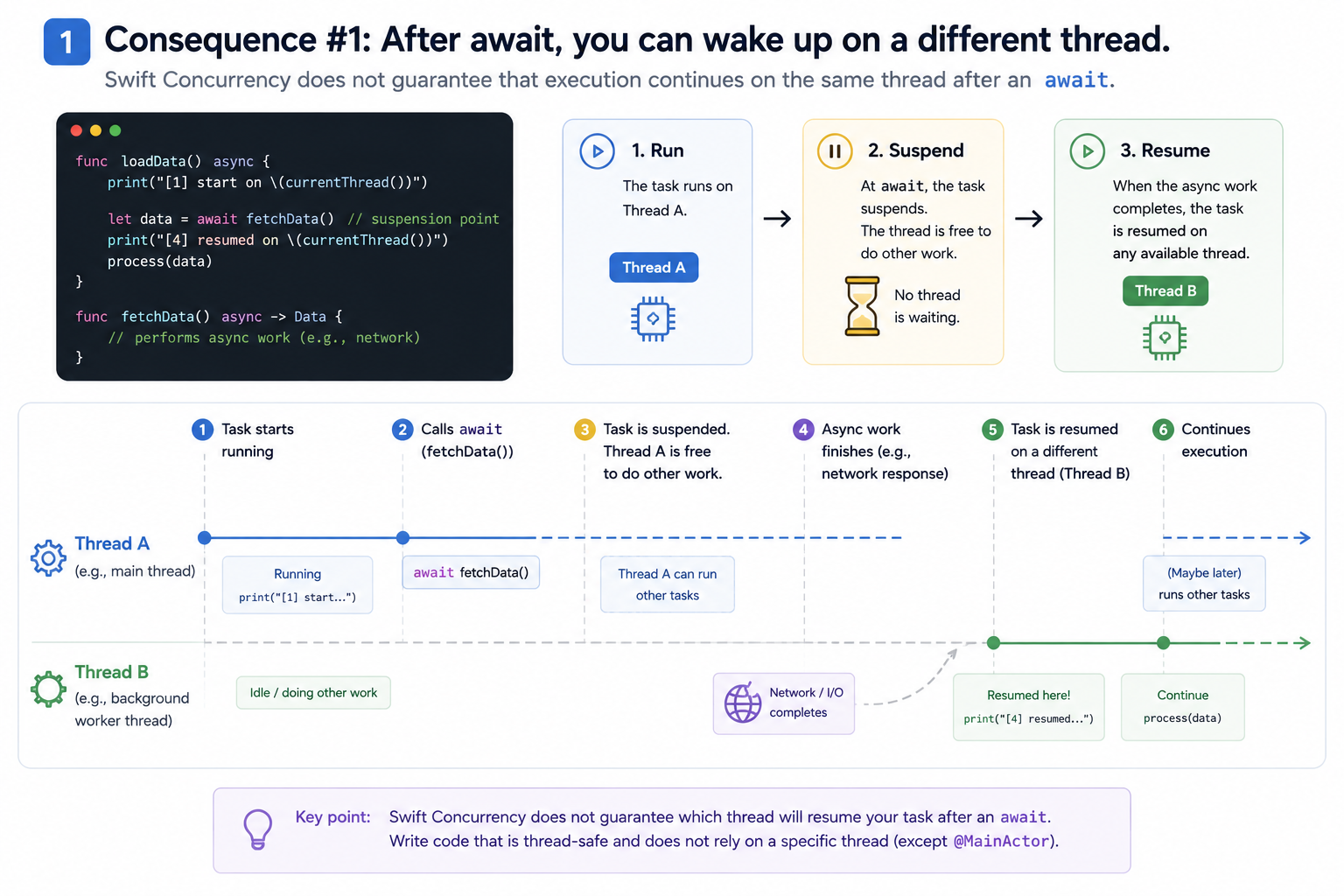
The right way. Two principles to take away:
- Don’t depend on the current thread. Anything keyed to “the running thread” — thread-local storage,
Thread.current, a thread ID — can be wrong across anawait. If you need data to travel along with the async context, use@TaskLocal, not thread-local. - If you need the main thread to touch the UI, say so explicitly with
@MainActor. Don’t assume “after await it automatically returns to the main thread”.
// ❌ WRONG: assuming we're still on the main thread after await
func refresh() async {
    let data = await fetch()
    label.text = data          // could be on any pool thread -> UI glitch/crash
}

// ✅ RIGHT: attach @MainActor -> after await it's guaranteed to resume on the main thread
@MainActor
func refresh() async {
    let data = await fetch()   // fetch can run anywhere,
    label.text = data          // but this line is guaranteed to be on the main thread
}
–> But if it runs inside @MainActor from the start, the first example is fine — it preserves the context.
Remember the exception mentioned: code that belongs to @MainActor always resumes on the main thread after await — not because of thread affinity, but because the main actor’s door leads to exactly one thread (this will become clearer in Idea 2).
Consequence 2. Never hold a lock across an await.
let lock = NSLock()

func update() async {
    lock.lock()
    let value = await compute()   // cut: chunk 2 may run on a different thread
    cache = value
    lock.unlock()                 // may be called from a thread that never locked it
}
A mutex-style lock remembers which thread locked it and expects unlock from that same thread. Chunk 2 may run on a different thread, so unlock() violates that, and Apple’s docs state the result plainly: unlocking a lock from a different thread is undefined behavior.
In practice, “undefined” plays out as one of these, from best to worst.
- Best: the runtime detects the foreign unlock and crashes the process immediately (
os_unfair_lockdoes this with a clear message). Annoying, but you find the bug on the very first test run. - In between: the lock’s internals get corrupted, and some later
lock()leads to a permanent deadlock, so you go debugging in the wrong place. - Worst: it silently appears to work on your machine, your OS version, ships to production -> fails in one of the two ways above on someone else’s machine. The bug is now invisible in your code and impossible to reproduce on your machine.
Independent of all three: while the lock is held across the suspension, every other thread that wants it is blocked — which is itself already forbidden. A lock is fine in async code, but only between two awaits.
Why is “between two awaits” fine? Because the stretch lying between two awaits is a single synchronous chunk — it runs entirely on one thread, uncut (no await means no cut). So lock() and unlock() are guaranteed to be on the same thread, and the lock is only held for an instant. The trick is: await first, then lock — and inside the locked region, absolutely never let an await slip in:
func update() async {
    let value = await compute()   // await FIRST, no lock held yet
    lock.lock()
    cache = value                 // critical section: NO await inside
    lock.unlock()                 // same thread as lock() -> safe
}
And if the state needs to be protected across stretches that contain await, then a manual lock is no longer the right tool — let an actor do that job (it serializes with a “door”, no lock needed). Or use Mutex from the Synchronization framework with withLock { ... }: this closure-style API makes it impossible for you to sneak an await into the middle of the locked region, so it blocks the mistake at the root.
Consequence 3. A semaphore can hang the entire app.
func loadSync() -> Data? {
    let sem = DispatchSemaphore(value: 0)
    var result: Data?
    Task {
        result = await load()
        sem.signal()
    }
    sem.wait()   // block the current thread until signal() is called
    return result
}
A semaphore is a blocking primitive: wait() blocks the calling thread until someone calls signal(). Here it’s “kick off async work, block until it’s done, return the result synchronously”.
The trap: if loadSync itself runs on a pool thread, then sem.wait() pulls that pool thread out of service. Call it from several places at once and every pool thread gets stuck in wait(). The chunks of load() are ready to run, but running them needs a free pool thread, and there are none left, and the pool cannot grow to save you. Nobody ever reaches signal(). On a 2-core machine, just two concurrent calls are enough to freeze everything.
This is the most common production deadlock in codebases that bridge between old and new concurrency this way. (A handy debugging trick: an environment variable can shrink the pool down to exactly one thread in tests, making every violation of this kind reproduce instantly.)
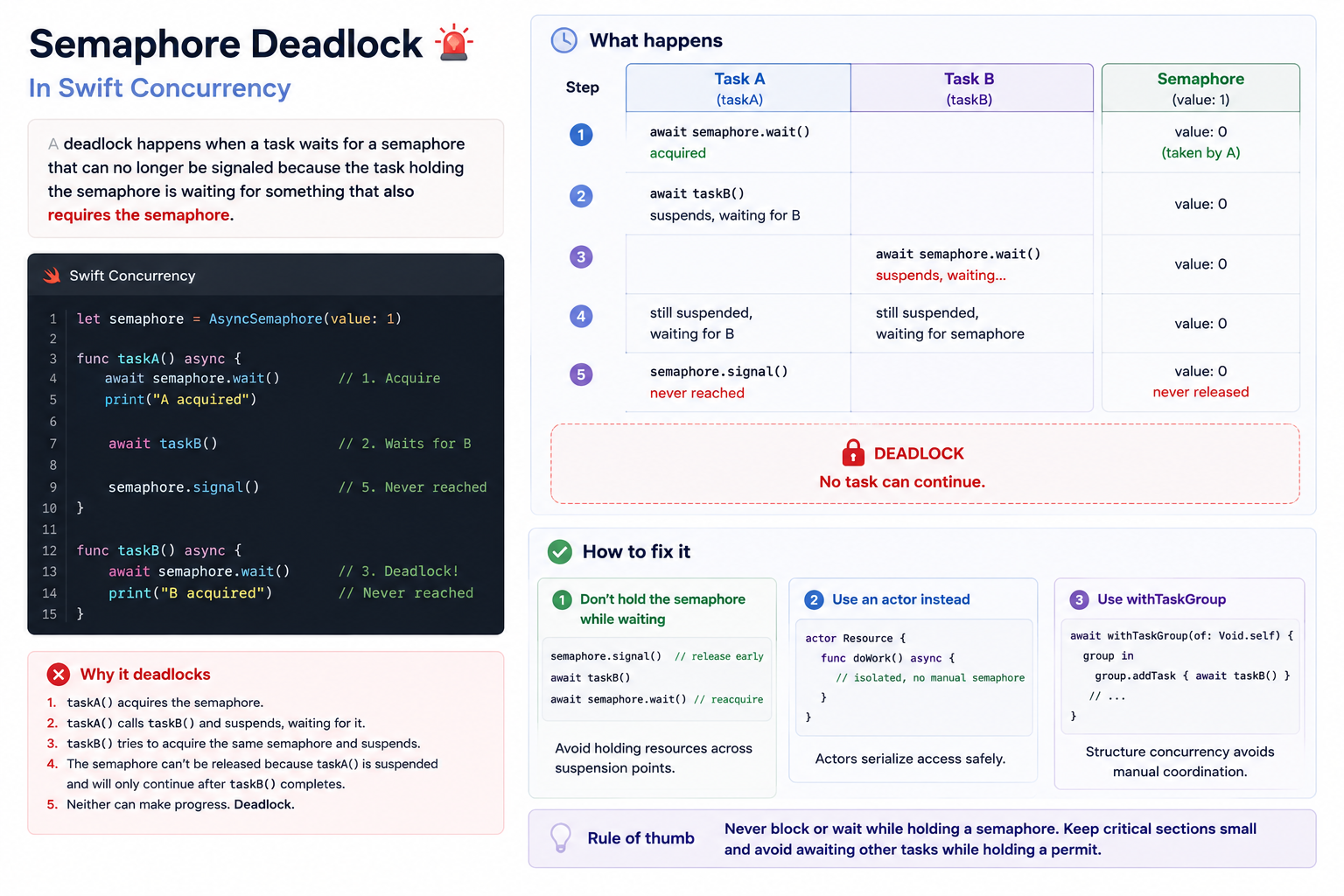
The fix. The root of the problem is forcing an async call into a synchronous one by blocking a pool thread. Don’t bridge that way. The right approach is to let async “flow” straight up: any function that needs an async result is itself async and awaits, instead of wrapping it into a sync function and sitting there waiting.
// ❌ WRONG: force async -> sync with a semaphore, blocking a pool thread
func loadSync() -> Data? {
    let sem = DispatchSemaphore(value: 0)
    var result: Data?
    Task { result = await load(); sem.signal() }
    sem.wait()                 // block the pool thread -> risk of deadlocking the whole pool
    return result
}

// ✅ RIGHT: keep it async, await directly
func load() async -> Data? {
    await realLoad()
}

let data = await load()        // the call site is async too, nothing is blocked
And when the call site is truly synchronous code (an @IBAction, a delegate method), don’t sit and block waiting — open a Task at the “edge” of the async world and update the UI right inside it:
@IBAction func didTapLoad() {
    Task {
        let data = await load()
        updateUI(data)         // remember to hop back to the main actor when touching the UI
    }
}
(For the unavoidable case where you truly must block at a hard sync boundary — say you’re forced to implement a third-party synchronous API — that wait() must absolutely not sit on a pool thread; push it onto a thread/queue of your own. But treat this as a last resort; the right answer is almost always: don’t force it back to sync.)
Consequence 4. Thread.sleep steals a core, Task.sleep is free – this part is like thread.sleep with a delay.
Thread.sleep(forTimeInterval: 1)        // this thread is occupied doing nothing for 1s
try await Task.sleep(for: .seconds(1))  // no thread is stuck for 1s;
                                        // a timer will resume the function
First, what each line does. Thread.sleep(forTimeInterval: 1) tells the OS: put the current thread to sleep for one second.
The thread does nothing, but is still occupied: for that whole second it can’t run anyone else’s chunk.
Task.sleep(for: .seconds(1)) suspends the function, not any thread: the continuation goes to the heap, plus a note in the scheduler’s timer “one second from now, put this continuation back on the ready queue”.
The thread is released right at the cut and spends that whole second running other tasks’ chunks, or resting if there’s nothing to do.
A sleeping task consumes 0 thread-time.
The thread doesn’t “wait to come back to it”, because as always, no thread is tied to a suspended function.
Why this is a consequence of Concurrency: the pool has ~6 threads and never adds a seventh.
A thread stuck in Thread.sleep is, for that second, a lost core: one-sixth of the app’s entire computing capacity dedicated to doing nothing.
From the outside, the two lines look identical (“the code pauses for a second”), and that’s exactly what makes the first line dangerous.
Consequence 5. The execution order between tasks isn’t guaranteed, a lot like Java threads.
for i in 1...5 {
    Task { print(i) }
}
// Prints 1...5 in any order.
Where’s the chunk here? Each Task { } body is itself scheduled as a chunk: creating a task means “drop this code into the scheduler’s queue”, and a body with no await inside is simply a task made of exactly one chunk.
–> So the five task bodies land in the scheduler, and threads pick them up by priority and readiness, with no promise about which runs first created-first-run-first.
The scheduler is not a serial queue: unlike DispatchQueue.main.async, which guarantees FIFO order,
Task { } only guarantees the code will run, not when relative to its siblings.
If you need order, get it explicitly: await each piece of work one after another, or push them through an AsyncStream (it delivers values in exactly the order they were produced).
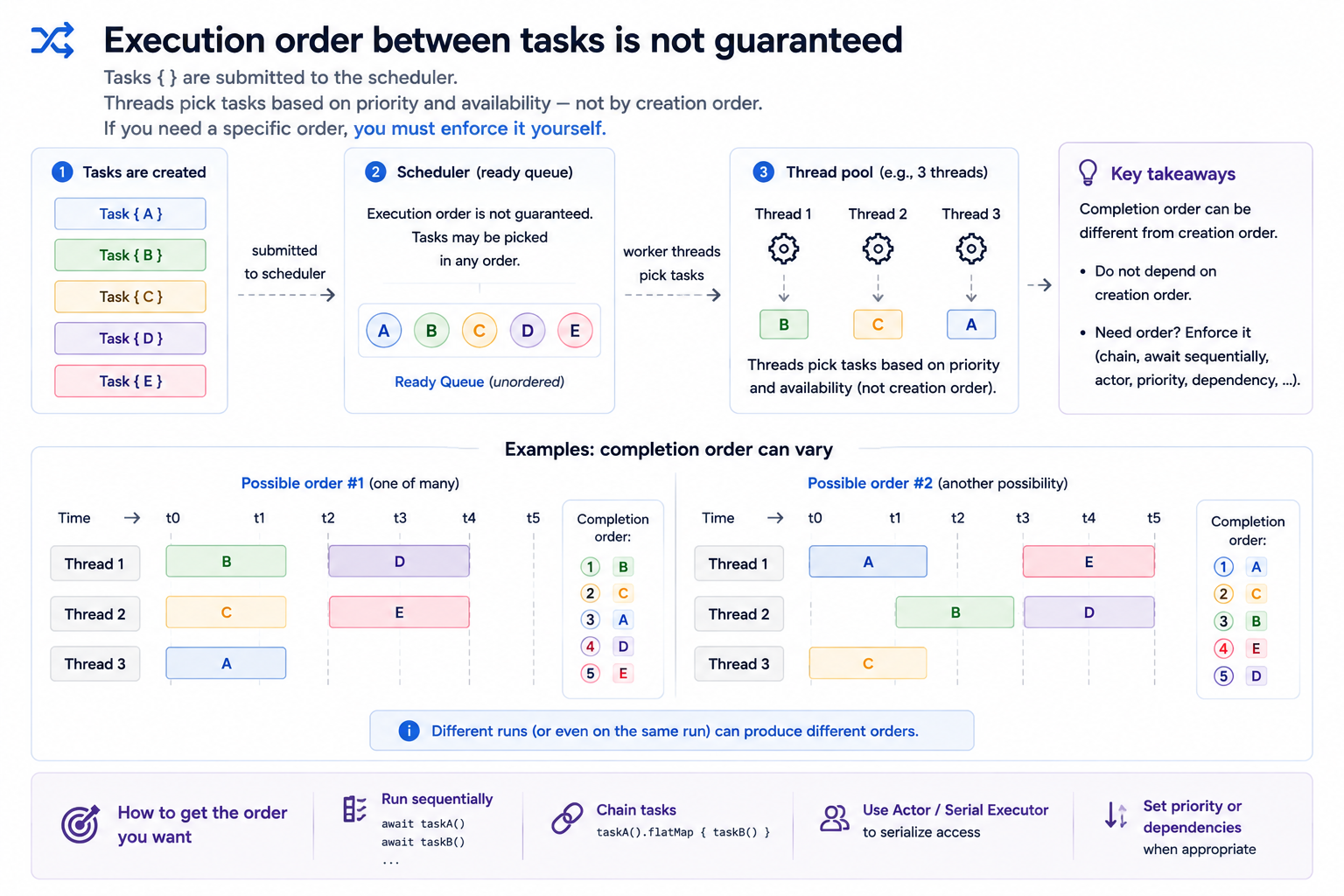
The right way. If you need order, you have to get it explicitly, don’t count on the scheduler’s luck:
// ❌ WRONG: 5 independent tasks -> run order NOT guaranteed
for i in 1...5 {
    Task { await process(i) }
}

// ✅ RIGHT: one outer Task, await sequentially -> runs exactly 1..5
Task {
    for i in 1...5 {
        await process(i)
    }
}
And when many places keep “pushing” work in and you need to handle it in exactly the order it was created, use AsyncStream — it provides values in exactly the order the producer submits them:
for await value in stream {   // received in exactly the order the producer pushes them out
    handle(value)
}
And here’s the spot that often causes confusion: an actor does NOT save you either.
An actor only promises that its jobs don’t overlap (one at a time, to avoid data races), it does not promise order — it can pick up a high-priority job and run it first, and even jobs of the same priority have no FIFO commitment. Completely different from a serial DispatchQueue (always FIFO).
Put in Java terms for easier mental picture: an actor is like synchronized — it guarantees mutual exclusion, but whichever thread grabs the lock first is not by queue order. If you want true ordering, that’s the job of a serial DispatchQueue or AsyncStream, not of an actor.
Wrapping up Part 2.
Part 2 has explained a few things to you as follows, and in Part 3 I’ll say more:
Functions don’t wait: they’re cut at every await into chunks, their state lives in a continuation on the heap, and a fixed pool of about one thread per core runs whatever chunk is ready.
Data doesn’t belong to a thread: it belongs to isolation domains, each domain has one door for one job to enter, and work at each suspension — guaranteeing the transaction but being a reentrancy trap.