Common mistakes with Kotlin Coroutine Flow on Android
Hi everyone, today I’d like to talk about a few common mistakes when working with Kotlin Coroutine Flow.
1: Using the wrong lifecycle, wasting resources, and crashing the app
In Android apps, we often collect Flows to display live-updating data on screen. However, you want to collect these streams in a way that avoids doing more work than necessary, which would waste resources (CPU and memory) or even leak memory when the app goes to the background.
Android provides two APIs—Lifecycle.repeatOnLifecycle and Flow.flowWithLifecycle—to help manage resources better.
You can expose Flow<T> from any layer in a clean architecture; that’s fine. But you should collect safely. This discussion is about Flow. For comparison, LiveData is different: when you observe with a viewLifecycleOwner, it observes from onStart to onStop automatically, so you don’t have to worry as much about wasted resources.
With Flow<T>, APIs like launchIn and collect will continue collecting even in the background. You could create a Job and cancel it manually, but that’s tedious and hard to control.
Here’s the lifecycle graph for reference:
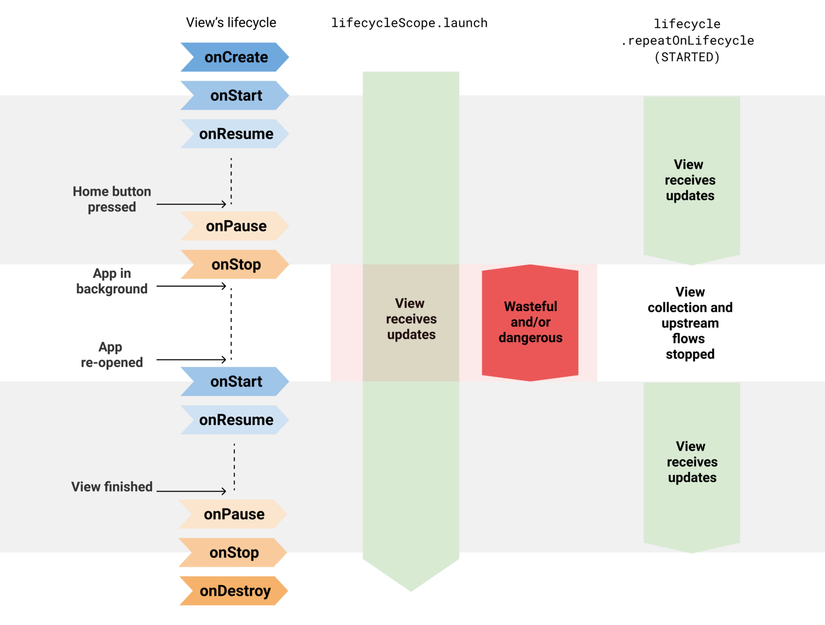
Example:
// Using callbackFlow (essentially a Channel) to update realtime location
fun FusedLocationProviderClient.locationFlow() = callbackFlow<Location> {
    val callback = object : LocationCallback() {
        override fun onLocationResult(result: LocationResult?) {
            result ?: return
            try { trySend(result.lastLocation).isSuccess } catch(e: Exception) {}
        }
    }
    requestLocationUpdates(createLocationRequest(), callback, Looper.getMainLooper())
        .addOnFailureListener { e ->
            close(e) // in case of exception, close the Flow
        }
    // clean up when Flow collection ends
    awaitClose {
        removeLocationUpdates(callback)
    }
}
And we collect and update the view like this:
class LocationActivity : AppCompatActivity() {
    override fun onCreate(savedInstanceState: Bundle?) {
        super.onCreate(savedInstanceState)

        // Collects from the view when lifecycle reaches STARTED
        // SUSPENDS when lifecycle goes to STOPPED.
        // All collectors are cancelled when lifecycle is DESTROYED.
        lifecycleScope.launchWhenStarted {
            locationProvider.locationFlow().collect {
                // ...
            }
        }
        // Similar pitfalls with:
        // - lifecycleScope.launch { /* collect from locationFlow() here */ }
        // - locationProvider.locationFlow().onEach { /* ... */ }.launchIn(lifecycleScope)
    }
}
What’s the problem? lifecycleScope.launchWhenStarted suspends the coroutine when the Activity/Fragment is stopped. New locations are not handled while suspended, but the callbackFlow producer keeps sending locations. Using lifecycleScope.launch or launchIn(lifecycleScope) is even riskier because the view may keep using location updates even in the background (imagine a reference into a view binding that’s already been destroyed) —> this can lead to crashes.
A manual fix is to cancel in onStop:
class LocationActivity : AppCompatActivity() {

    // Keep a Job
    private var locationUpdatesJob: Job? = null

    override fun onStart() {
        super.onStart()
        locationUpdatesJob = lifecycleScope.launch {
            locationProvider.locationFlow().collect {
                // ...
            }
        }
    }

    override fun onStop() {
        // Stop listening in onStop
        locationUpdatesJob?.cancel()
        super.onStop()
    }
}
This works but adds boilerplate. If you’re listening to a dozen flows, it becomes painful to manage.
Instead, as the lifecycle diagram suggests, use Lifecycle.repeatOnLifecycle:
class LocationActivity : AppCompatActivity() {
    override fun onCreate(savedInstanceState: Bundle?) {
        super.onCreate(savedInstanceState)

        // Launch a new coroutine because repeatOnLifecycle is suspend;
        // avoid nested suspension issues
        lifecycleScope.launch {
            // This runs with viewLifecycleOwner’s lifecycle.
            // It starts when lifecycle is STARTED and cancels when STOPPED.
            // It will automatically restart when lifecycle becomes STARTED again.
            lifecycle.repeatOnLifecycle(Lifecycle.State.STARTED) {
                // Safe: collect and update location while STARTED
                // Stop collecting when STOPPED
                locationProvider.locationFlow().collect {
                    // ...
                }
            }
        }
    }
}
The above shows how to collect safely from the UI layer (XML). In Compose, there’s a newer API collectAsStateWithLifecycle you can look into.
2: Using emit / tryEmit / update without understanding their implementations
When using MutableStateFlow, you’ll definitely need to update values. There are several functions: emit(), tryEmit(), and update(). When to use which?
suspend fun emit(): Use to emit a value. This will suspend if the flow is configured withonBufferOverflow: BufferOverflow = BufferOverflow.SUSPENDand the buffer exceedsextraBufferCapacity. Emission resumes after collectors catch up.fun tryEmit(): Emits without suspending. Returnstrueif successful. IfonBufferOverflow = BufferOverflow.SUSPENDand the buffer exceedsextraBufferCapacity, it returnsfalse.fun update(): Use to update the value of aMutableStateFlow. Collectors only get a change event whencurrentValue != newValue. Internally,updateloops until the CAS succeeds (i.e.,newValueis set). Some important notes:- Never override
equals()to always returnfalse: that can cause the loop to never converge and block indefinitely. - If multiple threads concurrently update the
StateFlow,updatewill optimistically retry; the current thread stays in the loop until it succeeds.
- Never override
Example:
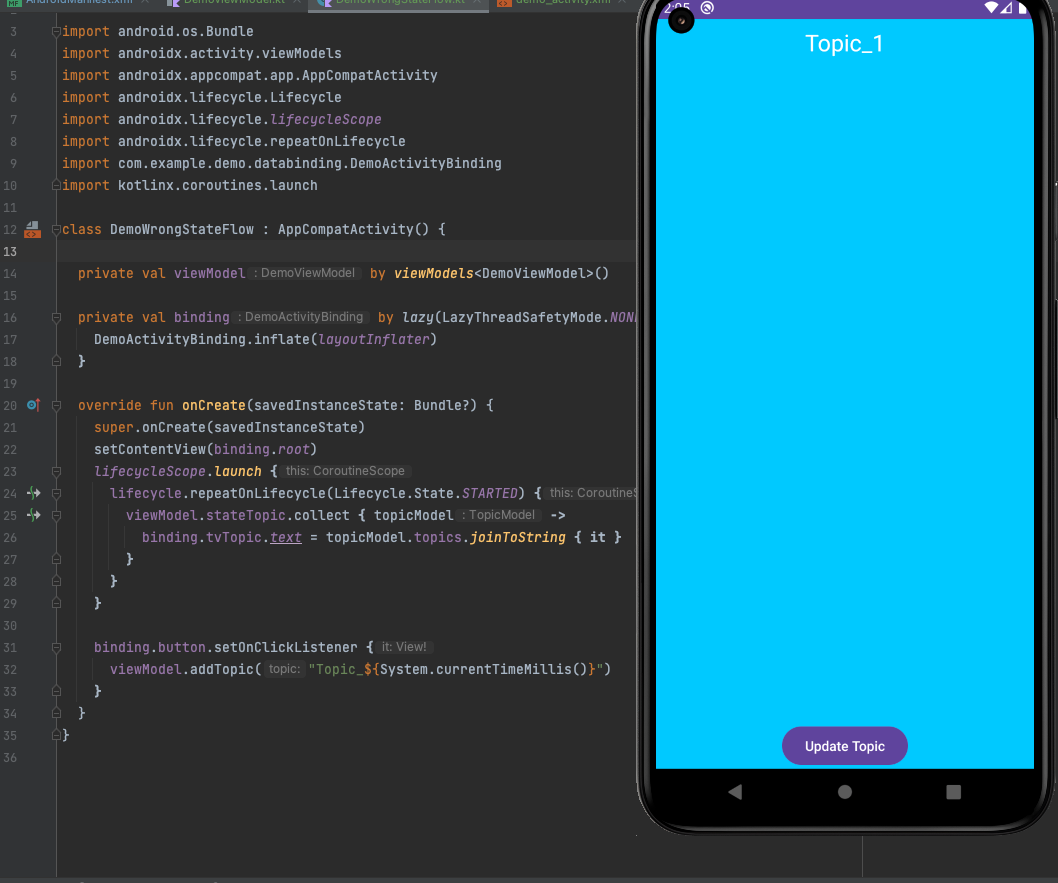
Here I created an Activity that demos pressing a button and updating UI.
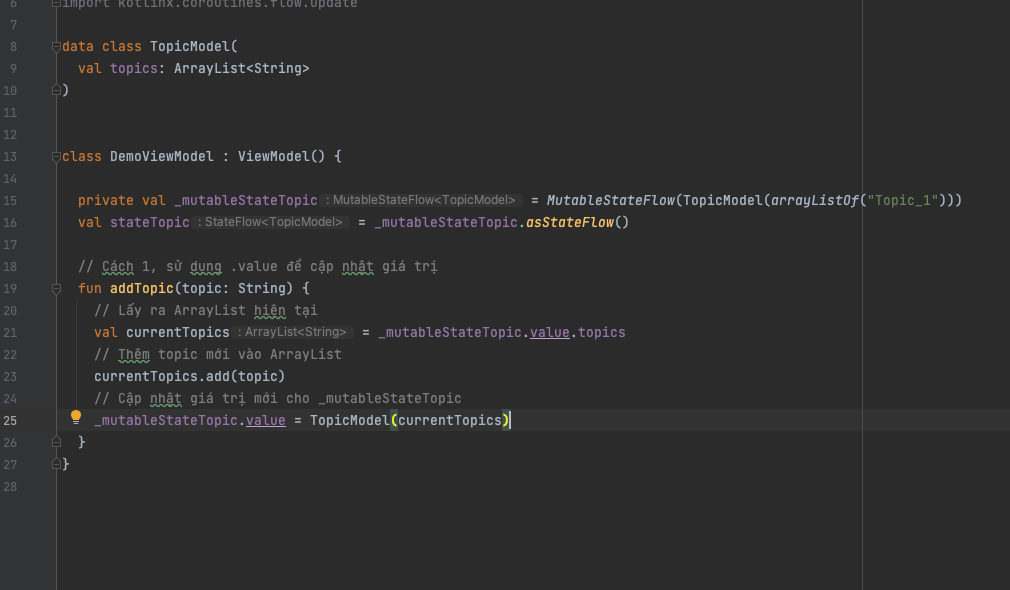
Way 1: Using .value to update. Notice I used ArrayList (not stable). Even after pressing the button, the value doesn’t update on screen. That’s because data class equality compares fields, not references —> a new object with the same content is considered equal —> .value set, but collectors see no change.
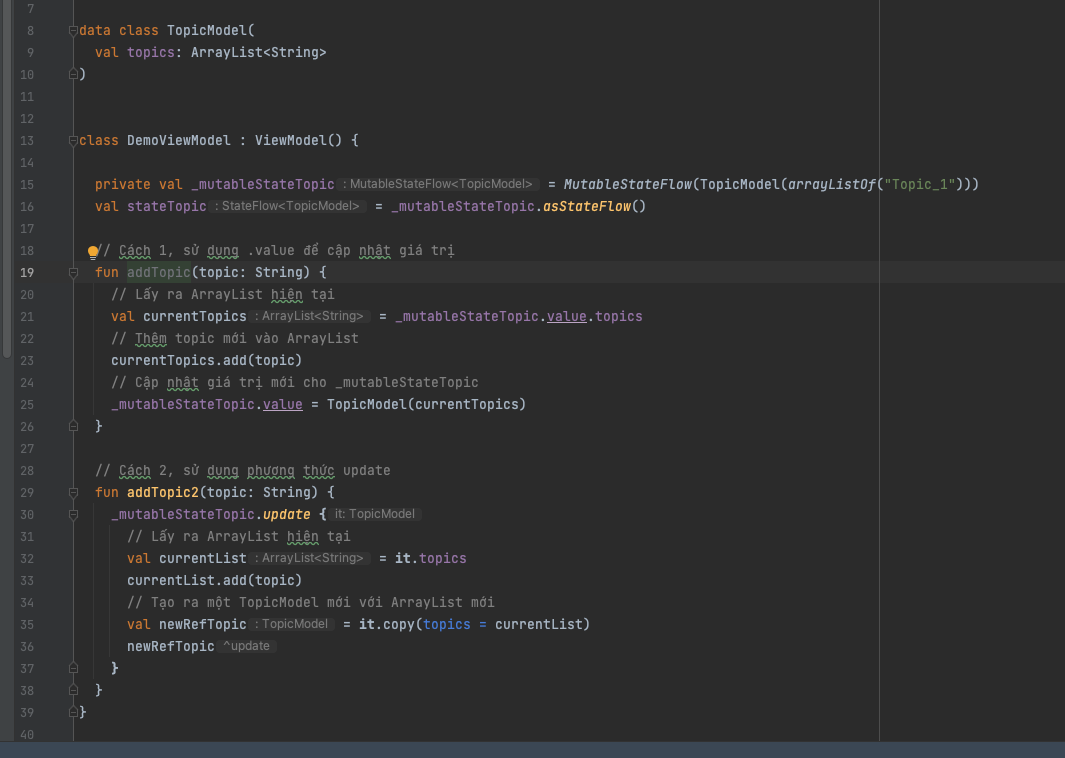
Way 2: Using update, still failed. I even cloned a new reference, but data didn’t update on screen. Same reason: data class equality and unchanged content.
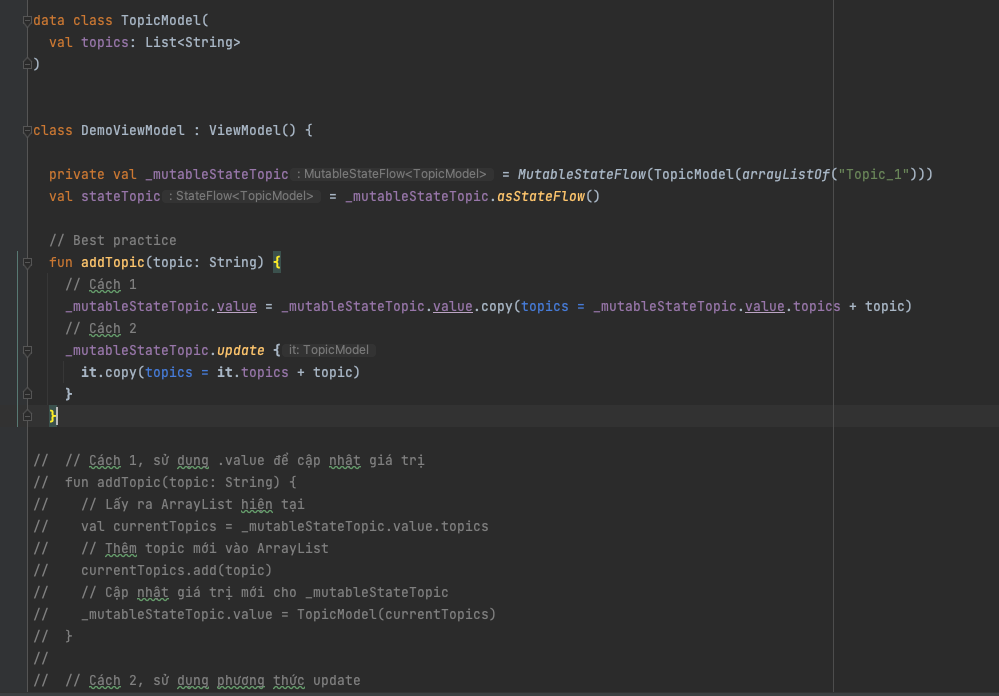
Fix: Use data class with immutable fields. The more immutable your code is, the fewer bugs you’ll face.
3: Referencing a StateFlow’s value
We often grab the current value like this:
private val topicStateFlow = MutableStateFlow(Topic())
val topicCurrent = topicStateFlow.value
Looks fine, right? In reality, MutableStateFlow is an interface:
public interface MutableStateFlow<T> : StateFlow<T>, MutableSharedFlow<T> {
    public override var value: T
}
value is a generic property. When the StateFlow updates, its value changes accordingly. So assigning val topicCurrent = topicStateFlow.value seems okay?
Under the hood, if you just look at the interface, you might think value is a regular property; therefore you could store it in a variable and read it later. But in the implementation, it’s backed by a field; the true value is held by _state. A “backing field” is effectively a function (getter/setter) wrapped by a property.
private class StateFlowImpl<T>(
    initialState: Any // T | NULL
) : AbstractSharedFlow<StateFlowSlot>(), MutableStateFlow<T>, CancellableFlow<T>, FusibleFlow<T> {
    private val _state = atomic(initialState) // T | NULL
    private var sequence = 0 // serializes updates, value update is in process when sequence is odd

    @Suppress("UNCHECKED_CAST")
    public override var value: T
        get() = NULL.unbox(_state.value)
        set(value) { updateState(null, value ?: NULL) }
}
So topicCurrent is only set once via the backing field at the time you assign it. When the StateFlow updates _state, topicCurrent still holds the old value.
How not to fall into this trap:
- Expose a read-only
StateFlowfromMutableStateFlowviaasStateFlow()and readvaluewhen needed. - If you need a variable that always reflects the current value, use a backed property:
private val topicStateFlow = MutableStateFlow(Topic())

val currentTopic
    get() = topicStateFlow.value
4 : Don’t use SharedFlow for single events
StateFlow is a child of SharedFlow and acts as a state holder, always retaining a value (similar to LiveData). With LiveData, many of you solved “replayed data” by setting up a single observer and guarding with atomics so the value is consumed once.
SharedFlow lets you configure replay and extraBufferCapacity. You might have tried MutableSharedFlow(replay = 0, extraBufferCapacity = 0) to mimic SingleLiveEvent. In quick tests, it seems to work: events are not replayed to new subscribers.
BUT… if collectors stop collecting while the SharedFlow keeps emitting, you will miss events (since both replay and extraBufferCapacity are zero).
When does this happen? As shown in the lifecycle section above, flows can be suspended; the UI goes to onStop…
Example: You use MutableSharedFlow(replay = 0, extraBufferCapacity = 0) to share API error events. The UI collects errorFlow while foregrounded. When the app goes to background, UI stops collecting, but background work keeps calling the API and emits errors into errorFlow. When the UI comes back, no error is shown —> missed event.
What do we need instead? A flow that satisfies:
- The event must be consumed once and only once.
- The event must persist and not be missed even when there are no collectors.
The answer is Channel. We can build a hot flow from a Channel to emit and consume single-shot events reliably.
4 : Channel with the wrong Dispatcher
A Channel behaves like a blocking queue, but since Kotlin 1.4, Channels have prompt cancellation guarantees. You should send/trySend and collect on Dispatchers.Main.immediate; otherwise events may be lost (undelivered).
Using just Dispatchers.Main can still be wrong, because it might not execute immediately (e.g., during a handler callback or choreographer animation frame stage).
Therefore, the main thread still has latency. Prefer Dispatchers.Main.immediate, and use non-blocking trySend to send and collect events.
These are the mistakes and lessons I’ve run into when using Coroutine + Flow without fully understanding the internals—compiled from multiple sources and my own experience. Thanks for reading!